Baseball Pitch Trajectory Simulator
See how any pitch moves through space — from release to the catcher’s glove
A free, browser-based tool that simulates the 3D trajectory of a pitched baseball using real physics. Search any MLB pitcher, pick a pitch, and watch it fly.
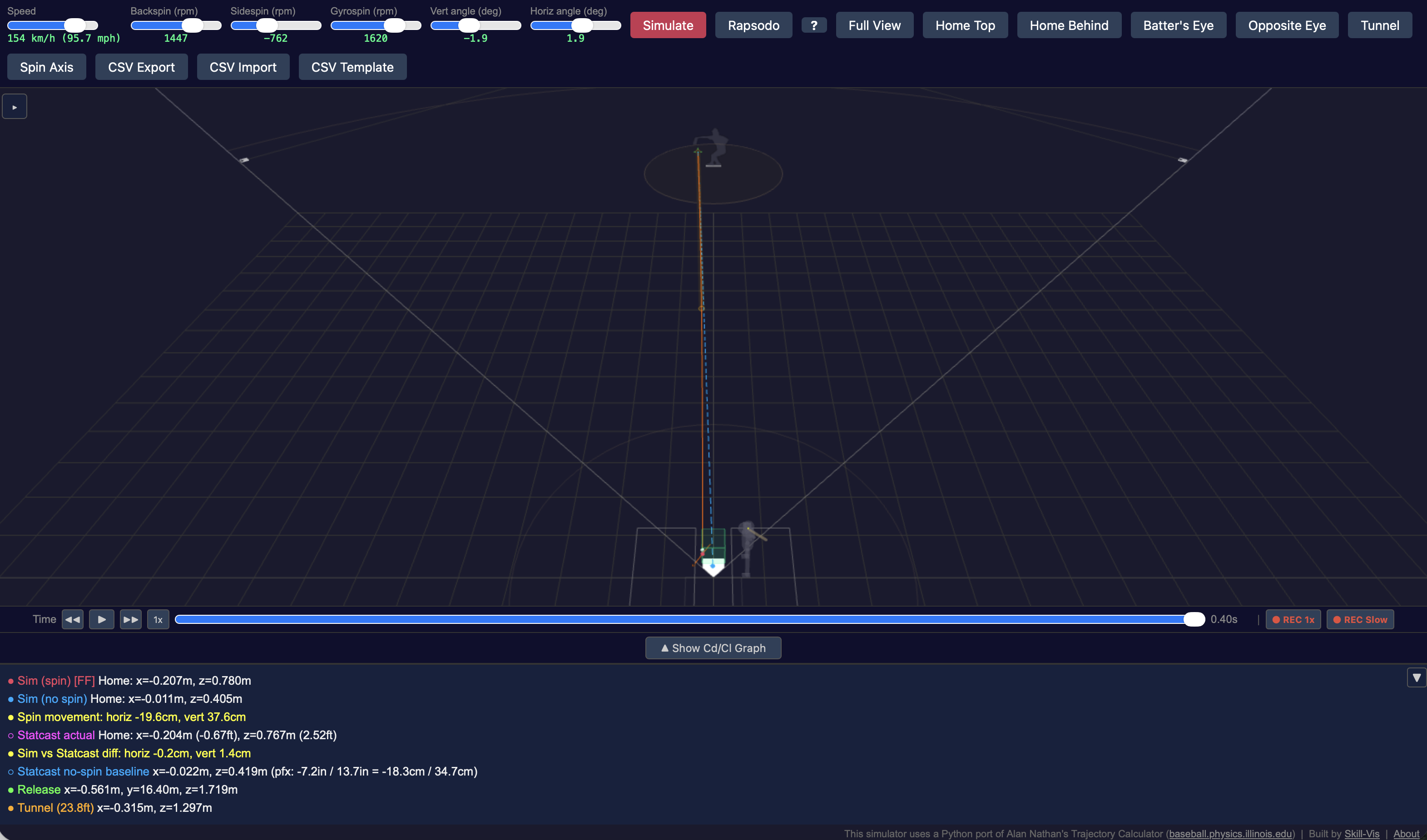
What It Does
You type a pitcher’s name. The simulator pulls their actual pitch data from MLB Statcast — every four-seam fastball, slider, curveball, and changeup they threw. Data is available from 2016 to the current season. Pick any pitch, hit Simulate, and watch the ball travel from the pitcher’s hand to home plate in 3D.
The trajectory is not an animation based on video. It is a physics simulation. The ball’s path is computed from its release speed, spin rate, and spin axis using the same aerodynamic model developed by Prof. Alan Nathan at the University of Illinois — the standard reference for baseball trajectory research.
Why It Matters
For Pitching Coaches
Overlay a pitcher’s fastball and changeup to see if they tunnel effectively. See exactly where and when the two trajectories diverge.
For Analysts
Compare spin decomposition (backspin, sidespin, gyrospin) across pitchers. Get season-wide summaries with spin efficiency and BSG breakdown via the API. Export full trajectory data to CSV.
For Player Development
Enter Rapsodo measurements directly and simulate the resulting trajectory. Test “what if” scenarios by adjusting spin rate or axis.
Key Features
| Feature | Description |
|---|---|
| MLB Statcast Integration | Search any pitcher, browse their game-by-game pitch data, simulate any individual pitch |
| Season Summary API | Per pitch-type averages (speed, spin, movement, BSG, spin efficiency) and monthly trends in a single request |
| Multiple Input Modes | Statcast data, manual sliders, or Rapsodo measurements |
| Overlay Comparison | Stack multiple pitches to compare trajectories side by side |
| Batter’s Eye View | First-person camera from the batter’s box — see what the hitter sees |
| Pitch Tunnel | Visualize the tunnel point (23.8 ft) where the batter must decide |
| Spin Axis on the Ball | Animated baseball with procedural seam texture, rotating at real angular velocity |
| CSV Import / Export | Full trajectory data with velocity, acceleration, and force breakdown |
| Video Recording | Export the 3D view as MP4 |
| Shareable Links | Each simulation generates a URL that recreates the exact same pitch in a browser |
| Claude Desktop (MCP) | Query Statcast data and run simulations using natural language from Claude Desktop. Setup guide |
| Adjustable CL Model | Choose between Statcast-fitted (cl2=1.045) or Nathan original (cl2=1.12) lift coefficients |
Pitch Types at a Glance
The simulator uses the same pitch type classification and color coding as MLB Statcast:
FF 4-Seam Fastball SI Sinker FC Cutter SL Slider CU Curveball CH Changeup FS Splitter ST Sweeper
How the Physics Works
The simulator solves the equations of motion for a spinning ball in air:
- Drag force slows the ball down (opposing its velocity)
- Magnus force pushes the ball sideways and/or upward, perpendicular to both the spin axis and the velocity
- Gravity pulls the ball down (g = 9.80 m/s², MLB stadium average)
The spin is decomposed into three orthonormal components:
- Backspin — rotation around the axis perpendicular to velocity in the horizontal plane. Creates “rise” (resists gravity). A four-seamer with 2200 rpm backspin drops about 40 cm less than a ball with no spin.
- Sidespin — rotation around the axis perpendicular to both the velocity and the backspin axis. Creates horizontal movement.
- Gyrospin — spin around the velocity direction (like a bullet). Does not create Magnus force. A pitch with high gyrospin and low backspin/sidespin will have less movement despite high total spin rate.
The BSG basis is orthonormal: eb = eg × eZ (horizontal), es = eb × eg, where eg is the velocity direction and eZ is vertical. This ensures clean decomposition with no leakage between components.
Ball parameters match Nathan’s Excel Trajectory Calculator: mass = 5.125 oz, circumference = 9.125 in.
The simulation uses 4th-order Runge-Kutta integration with 0.001-second time steps.
API Access
The simulator exposes a public REST API. Key endpoints:
| Endpoint | Description |
|---|---|
POST /statcast/search |
Search for a pitcher by name |
POST /statcast/games |
Get game dates for a pitcher/year |
POST /statcast/pitches |
Get all pitches for a game date |
POST /statcast/simulate |
Run trajectory simulation |
POST /statcast/season_summary |
Season-wide pitch-type summary with BSG and monthly trends |
No API key required. Base URL: https://baseball.skill-vis.com
For natural language access via Claude Desktop, see the MCP Server setup guide.
Credits
- Physics model: Alan Nathan’s Trajectory Calculator
- Pitch data: MLB Statcast via Hawk-Eye tracking
- Baseball seam curve: mathcurve.com parametrization
- CL model calibration: Fitted against 120 pitches from 6 MLB pitchers (2025 season)